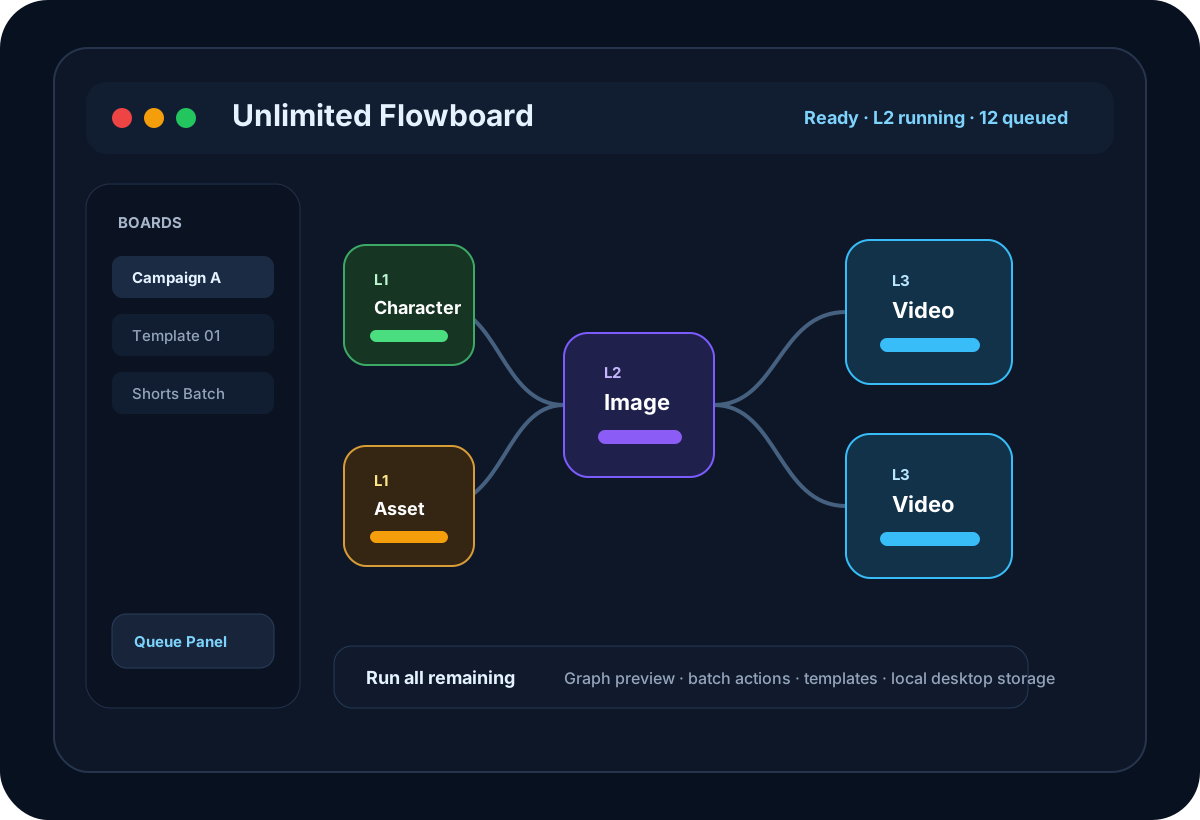
Unlimited Flowboard is a desktop AI workflow canvas built for creators who need more structure than a single prompt box can provide. Instead of manually repeating the same upload, prompt, generation, and video steps, you can model the whole production process as a connected graph.
Build AI media workflows visually
The canvas supports character, visual asset, image, video, storyboard, prompt, and note nodes. Each edge represents a real dependency, so your workflow stays readable even when a campaign grows into many scenes, variants, and downstream video outputs.
Run exactly the part of the graph you need
Unlimited Flowboard can run all remaining nodes, the next ready level, a specific level, selected nodes, a single node, or a downstream branch. Before execution, the graph preview shows which nodes are ready, blocked, skipped, or missing required inputs.
Move faster with batch actions and auto-prompt
Batch controls let you update variant counts, video quality, aspect ratio overrides, generated media, and status across selected nodes. Smart auto-prompt can generate prompt drafts from upstream context, making it easier to create consistent image and video variations.
Designed for desktop production
The app packages a local workspace with board storage, media history, templates, queue tracking, progress, and desktop activation. Your workflow data remains in the desktop user data folder while the license system keeps access tied to your machine.